The Best Time Management Software for Your Suffolk County Small Business

The Best Time Management Software for Your Suffolk County Small Business

Key Takeaways

  • Effective time management is about implementing scalable systems that reduce administrative friction, not micromanaging employees.
     
  • Most businesses struggle in one of three specific areas: project management, time tracking, or scheduling.
     
  • Avoid feature overload and choose a tool based on your current team size and technical comfort level.
     
  • The goal of time management software is to move you, the business owner, from managing the work to leading the business.
     

Did you finish yesterday feeling exhausted, but with your long-term business goals still right where you left them? 

If your time is getting eaten up daily by busy work, it’s time to stop pushing harder and start building better systems

This guide will help you identify where your time is leaking and which tools will help you plug those holes… 

So you can get back to the work that boosts your bottom line.


What is effective time management for small businesses? 

I see a lot of business owners assume the answer is tighter control and more oversight (sometimes even to the point of micromanagement). 

But on that path, you spend so much time managing the work that you have less time actually leading the business.

You need better systems, not tighter pressure. 

When you have the right time management systems and tools in place, a few practical things improve:

  • Clearer accountability. Everyone knows exactly what they are responsible for and when it’s due.
     
  • Data-driven billing. Accurate time tracking ensures you aren’t leaving money on the table or over-servicing clients at the expense of your margins.
     
  • Reduced decision fatigue. Automated scheduling and templated workflows mean you spend less mental energy on logistics.
     
  • Improved employee morale. Teams thrive when they have clear expectations and the right tools to do their jobs without constant oversight.
     
  • Scalable operations. Systems allow your business to handle more volume without requiring you, the owner, to work more hours.

Integrating the best time management software breaks down into three separate areas: project management, time tracking, and scheduling. 


What are the best project management tools for small businesses?

Feel like you’re constantly hunting for status updates in email threads or losing track of who is responsible for what? Your Long Island business has outgrown its current workflow. 

These project management tools offer the best balance of power and ease of use for growing teams.

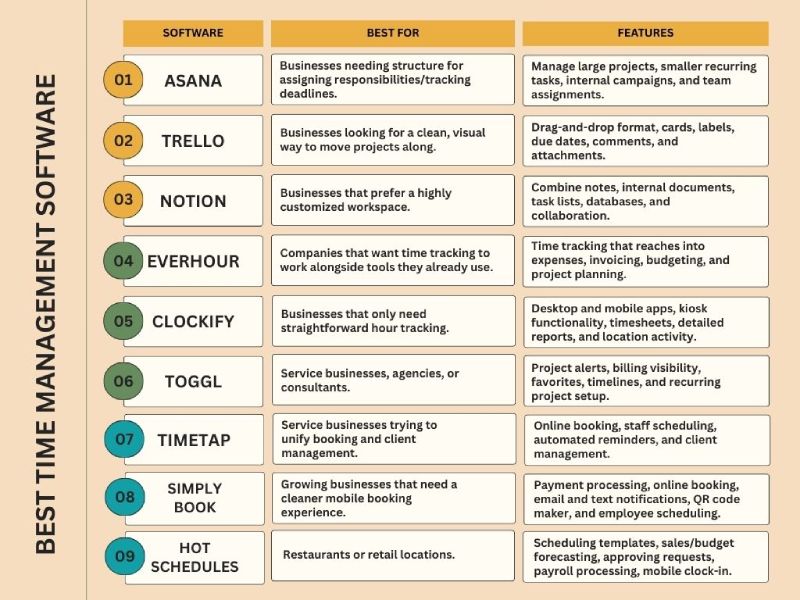
1. Asana

If projects are stalling because ‘ownership’ is vague, I recommend a structured system like Asana. 

It moves the status update out of your inbox and into a centralized record, which is the only way to scale your leadership without scaling your hours.

It also integrates with a very long list of other tools, including Microsoft Teams, Slack, and Google Workspace. (Plus, it has a Chrome extension, which lets you save things from the web and turn them into tasks right away.)

For annual plans, you get the options of a free version, a $10.99 annual starter plan ($13.49 monthly), and a $24.99 annual business plan ($30.49 monthly).

2. Trello

Maybe you don’t need a full operational command center with all the bells and whistles. You’re just looking for a clean, visual way to move work from not started to done.

Trello could be the project management software for you.

Its Kanban-style boards are easy to understand quickly. And Trello’s drag-and-drop format, cards, labels, due dates, comments, and attachments make it one of the easier tools to adopt without much resistance.

This can be a very good fit if you have a smaller team, you’re a solopreneur, or you just want a better to-do system before committing to something bigger.

Trello offers: 

  • A free plan
     
  • An annual $5/month standard plan (or $6 billed monthly)
     
  • An annual $10/month premium plan ($12.50 monthly)
     
  • A $17.50 per user per month enterprise plan (billed annually)

3. Notion

If you prefer more flexible systems, Notion may be a good fit. You can use it to create a highly customized workspace that matches how your team already thinks and works.

In Notion, you and your team can combine notes, internal documents, task lists, databases, and collaboration in one place. 

It’s free to use, but there’s a trade-off: Notion can feel overwhelming at first. It gives you a lot of control. But more control means more decisions, and those decisions take time.

Still, for the right business, it can become much more than a project tool. It can serve as an internal knowledge base, operations manual, meeting hub, and planning system all at once.


What are the best small business time tracking tools?

Without accurate time tracking, you’re essentially guessing at your profitability and payroll. These tools can help move you away from guesstimates and toward a precise understanding of where your labor costs are actually going.

1. EverHour

EverHour is especially useful if your Suffolk County business already operates within a broader tech stack. It’s designed for companies that want time tracking to work alongside tools they already use.

EverHour also reaches into expenses, invoicing, budgeting, and project planning. So, if your business needs to track work across different software and then translate that into budgeting or invoicing decisions, EverHour has a practical appeal.

You get the options of a free plan, an $8.50 annual team plan (or $10 billed monthly), and a custom plan for larger organizations.

2. Clockify

Clockify is pretty straightforward for basic hour tracking. Employees choose a project, clock in, and track their time. 

Its dashboard also gives you a better week-to-week view of where time is really being spent.

Clockify offers:

  • Desktop and mobile apps
     
  • Kiosk functionality
     
  • Timesheets
     
  • Time tracker
     
  • Detailed reports
     
  • Location activity for employees

3. Toggl

If you want time data to lead to better decisions (not just better records), Toggl is an option worth looking into. 

The dashboard, project alerts, billing visibility, favorites, timelines, and recurring project setup make it geared toward businesses that want to refine how work gets done.

That makes it especially useful for service businesses, agencies, consultants, or teams doing repeatable client work.

There’s a free plan, a $9 starter plan, an $18 premium plan, and an enterprise plan.


What are the best scheduling tools for small businesses?

An appointment mix-up can lead to a lost client. A bad shift handoff can create payroll headaches, employee frustration, and service gaps. 

That’s why finding the best scheduling software for your Suffolk County business is so important. Because client experience, staff morale, and your business’s reputation are on the line.

1. TimeTap

TimeTap is a great option if you own a service business and you’re trying to unify booking and client management.

You can use it for online booking, staff scheduling, automated reminders, and client management without having to keep everything in separate systems. You can also shape booking forms, email messages, and client profiles so the process feels more consistent with your brand and service model.

TimeTap offers a $22.45 professional plan, a $40.45 monthly business plan, and custom enterprise pricing.

2. SimplyBook

SimplyBook is helpful for growing businesses that need a cleaner mobile booking experience.

SimplyBook offers a more formal client booking structure than the manual scheduling system most small businesses start with. Its coupon tools also make it useful if you’re focused on customer retention efforts.

Pricing is free, then $11.90 per month for the annual basic plan (or $13.90 billed monthly), $24.90 for the annual standard plan ($29.90 monthly), $49.90 for the annual business plan ($59.90 monthly), and custom pricing for the enterprise plan.

3. HotSchedules

If you run a restaurant, retail location, or another business with multiple shifts and frequent coverage changes, HotSchedules relieves a lot of scheduling friction. 

HotSchedule includes:

  • Scheduling templates
     
  • Mobile alerts for overtime, breaks, and related issues
     
  • Sales and budget forecasting
     
  • Admin tools for approving shifts or time-off requests
     
  • Payroll processing
     
  • Mobile clock-in


Which time management software should I be using for my business?

Start by asking yourself: where is time breaking down in my business right now?

If the breakdown is around task ownership, deadlines, and collaboration, start with project management. If it’s payroll or billable hours, focus on time tracking. 

Or, if appointments and staffing are causing the stress, scheduling software will likely give you the fastest operational relief.

A few practical pairings might look like this:

  • If you run a growing service business, the best time management software for you might be Asana and TimeTap
     
  • If you own a small creative or consulting firm, you might do well with Trello and Toggl
     
  • If you operate a retail business or restaurant, you might see productivity gains from Clockify and HotSchedules
     
  • If your business is highly customized and process-minded, you might prefer Notion and EverHour


Final thoughts 

The reason I care about you using the best time management software is simple: clean data at the source is the only way we can accurately plan for your taxes and protect your margins. 

If you’re struggling to see where your labor costs are actually going, let’s look at your workflow. 

We can help you identify a system that ensures your financial records are audit-ready and that your profit-and-loss statements actually reflect reality.

631-485-7272


FAQs

“How do I implement a new time management tool into my business?” 

If the tool feels like extra work instead of a work-saver, your team will resist it. Start by choosing a tool with a clean mobile interface, like Trello or Clockify, and run a one-week pilot. Show your team how it reduces the number of status update emails they have to answer, and they’ll probably embrace it.

“Is it worth paying for a premium plan for small business time management software?” 

Free plans are great for testing the waters or for solopreneurs. However, once you have more than three employees, you usually need the paid features. Like automated reminders, advanced reporting, and payroll integrations. 

“Should I use separate apps for time tracking and scheduling?” 

In 2026, all-in-one tools like Notion or Connecteam are powerful, but they have a steeper learning curve. If your business has one specific pain point, like messy client bookings, start with a dedicated tool for that. You can always use integrations like Zapier later.

“Does time tracking hurt employee trust?” 

Not if you frame it carefully. Explain that accurate data helps you balance workloads fairly, prevents burnout, and ensures the business stays profitable so everyone keeps their jobs. 

“Can time management tools help with payroll and tax compliance?” 

Most modern time trackers sync directly with payroll software like QuickBooks or Gusto. This eliminates manual entry errors, which are the leading cause of payroll headaches and tax filing red flags.

How to Choose Payroll Software for Your Suffolk County Small Business

How to Choose Payroll Software for Your Suffolk County Small Business

Key Takeaways

  • The best payroll software for a small business is the one that fits your worker mix, pay schedules, compliance needs, and how you expect the business to grow.
     
  • At a minimum, your payroll system should automate calculations, support direct deposit, handle payroll tax filings and payments, integrate with your accounting system, and allow employees access to their own payroll information.
     
  • Compliance, ease of use, reporting, and security matter just as much as price does. Cheap software can become expensive very quickly when it creates errors or delays.
     
  • Before you commit, test your top options with a demo or trial and make sure the day-to-day workflow makes sense for you and your team.


Do more of your workers want to know more details about their paychecks?

Are you ever late issuing paychecks?

Are you struggling to keep up with filling out tax forms?

Is manually calculating payroll eating up your valuable time?

The right payroll software on hand can make all of that easier. 

But which payroll software is the right fit for your Suffolk County business? Let’s walk through a few things worth considering… 


Why do you need payroll software?

Payroll software automates your business’s payroll process by calculating wages, deductions, employer taxes, and benefit withholdings, then helping make sure your employees are paid. 

At its best, it takes a repetitive, detail-heavy process and makes it far more dependable.

It also gives you flexibility that older payroll processes often lack. You may:

  • Need direct deposit
     
  • Want employees to access their own pay stubs
     
  • Need payroll to sync with your bookkeeping or accounting software
     
  • Have a remote team
     
  • Have contractors in addition to employees

Good payroll software gives you room to handle all of that without having to rebuild the process every time your Long Island business changes.

There’s also the practical cost issue. Hiring internal payroll staff or piecing together manual systems can work for a while, but it rarely scales cleanly. 

Subscription-based payroll software usually gives you more predictable costs and, for many small businesses, a better balance between capability and overhead.

And beyond just “running payroll,” the better systems now connect payroll with time tracking, HR functions, employee records, reporting, and accounting. 


What are the essential features to look for in payroll software?

What actually makes a payroll system worth paying for? Here are the features to look for that will have the greatest impact on your day-to-day operations:

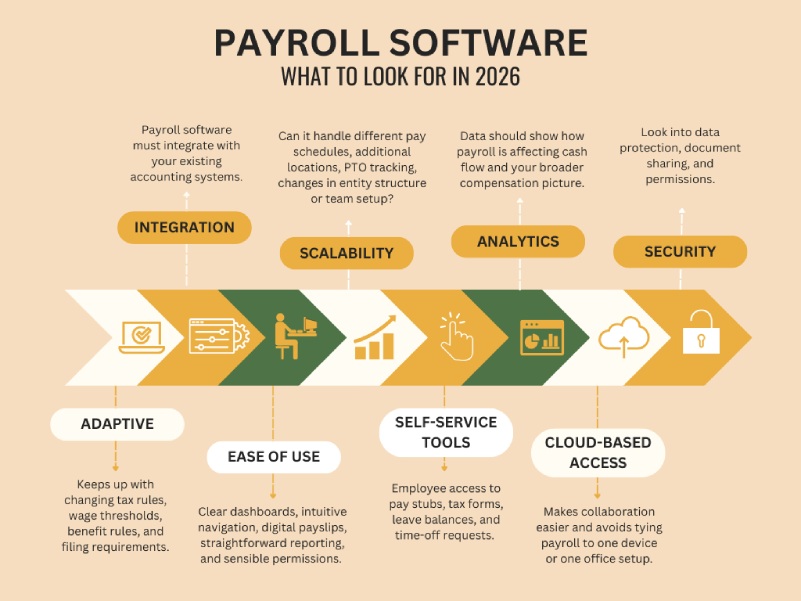
1. Software that keeps up with changing regulations

Tax rules, wage thresholds, benefit rules, and filing requirements all change somewhat frequently. And if your payroll software doesn’t keep up, you’re the one left dealing with the consequences.

Because noncompliance can lead to penalties, interest, correction filings, and unnecessary back-and-forth.

A strong payroll platform should update as regulations change, not force you to rebuild settings from scratch every time there’s a tax or wage update. That automatic updating saves time and helps reduce the chance that something slips through because you were busy running the business.

2. Integration with your accounting system

When your payroll software integrates with your accounting platform, you cut down on duplicate entry and reduce the chances of your books drifting away from what actually happened in payroll. 

A good integration will automatically create journal entries for each pay run, assign expenses and liabilities correctly, and move the data where it needs to go.

When payroll and accounting talk to each other, labor costs, payroll tax liabilities, contractor payments, benefits, and timing of cash outflows become easier to track. Which means you can spot trends faster and make better decisions.

3. Ease of use for both you and your team

Can you run payroll without hunting through six menus? Find reports quickly? Review time, leave, and approvals without bouncing around the system? Can a manager or delegated staff member do their part without needing constant help?

Your payroll software should make common tasks easier. So look for clear dashboards, intuitive navigation, digital payslips, straightforward reporting, and sensible permissions. 

4. Scalability and flexibility

Payroll systems are painful to switch once they’re embedded in your processes, so it’s worth thinking ahead. 

Make sure the software can handle… 

  • Adding more employees 
     
  • Different pay schedules
     
  • Additional locations
     
  • PTO tracking
     
  • Benefit deductions
     
  • Changes in entity structure or team setup

Also, many businesses now have a mix of hourly employees, salaried employees, tipped workers, contractors, and remote staff. Your payroll system should be able to accommodate that reality without forcing awkward workarounds.

5. Employee self-service tools

Employees having access to their own pay stubs, tax forms, leave balances, and time-off requests through a self-service portal means a lot less administrative friction for you.

For employees, self-service is convenient. For the business, it improves flow. It also reduces interruptions related to payroll, which is helpful when you’re trying to keep your attention on higher-value work.

6. Reporting and analytics

Detailed payroll reporting can show: 

  • Wage expense trends
     
  • Tax liabilities
     
  • Benefit contributions
     
  • Contractor payments
     
  • Overtime patterns
     
  • Year-to-date totals

Some systems also help track things like retirement plan contributions, employer matches, and contractor reporting.

With that data, you can see how payroll is affecting cash flow and what your broader compensation picture looks like.

7. Cloud-based access and security

Cloud-based payroll software has largely become the standard. It makes collaboration easier and avoids tying payroll to one device or one office setup.

Also, payroll contains highly sensitive information: addresses, Social Security numbers, bank details, wage data, and benefit information. 

So make sure to ask direct questions about security when you’re in a demo or a trial period for a certain software: 

  • How is data protected? 
     
  • What permissions can be limited? 
     
  • How are documents shared? 
     
  • What happens if there’s a breach? 

A payroll provider should be ready to answer those questions clearly.


How to choose payroll software for your business

Knowing how to choose payroll software is easier when you approach it in sequence instead of trying to compare every platform at once.

Step 1: Determine your payroll needs

Start with your actual business, not the software.

How many people are on payroll today, and how many do you expect in the next year or two? Are they employees or independent contractors (or both)? Do you have hourly workers, salaried staff, tipped workers, or multiple pay rates? Will you be running weekly, biweekly, semimonthly, or monthly payroll?

Location matters too. If your team works in more than one state (or country), that introduces another layer of complexity. 

Then think about your other systems. What accounting software do you use? Do you need features like time tracking, PTO tracking, benefits administration, HR tools, workers’ compensation support, or retirement contribution tracking?

Step 2: Establish a budget

Consider the full cost of the software, which includes:

  • Monthly base fee
     
  • Per-employee charges
     
  • Setup fees
     
  • Charges for tax filing or year-end forms
     
  • Support or implementation costs
     
  • Add-ons for time tracking, HR, or benefits

The cheapest option is not always the least expensive. If low-cost software creates cleanup work or filing problems, you may spend the difference elsewhere in time or professional help.

Step 3: Compare providers using your must-haves

Once you know what you need and what you can spend, make a shortlist of your top payroll software options. 

Then go beyond the brochure language. Look at how implementation works and how long direct deposit takes. Look at what support is included versus upsold. 

Read reviews with an eye toward recurring complaints (especially around customer service, setup issues, and tax filing problems).

Step 4: Review compliance and security closely

Again, your payroll provider should be able to keep pace with applicable tax and labor rules and support the filing obligations that come with payroll in your region.

It should also have a clear security posture around employee data and access controls.

This is one area where I would tell you not to settle for fuzzy answers. Be nosy. 

Find out how often the system updates for regulatory changes and what support is available when a payroll tax issue arises. Ask how permissions work. Ask how data is encrypted or protected. Learn what happens if there is a system issue or security event.

Step 5: Use demos and trials before deciding

Once you’ve narrowed your options to two or three, test them.

A demo or trial can tell you things a feature list won’t. 

For instance, whether the interface is intuitive, how easy reports are to find, and if someone on your team could use it without an unnecessarily long learning curve.


What’s the best payroll software for small businesses?

Of course, there’s no single best payroll software for every business. That depends on your setup, priorities, and budget.

However, there are a few options that are considered the overall frontrunners: 

1. Gusto Payroll

Gusto Payroll offers full-service payroll, automated payroll options, tax filings and payments, and employee-facing tools. It also includes HR-related features like onboarding and benefits administration.

It’s probably a strong fit if you want an approachable interface and a broader platform beyond just payroll.

2. QuickBooks Payroll

QuickBooks Payroll is a strong contender if you already use QuickBooks Online. When your payroll and accounting are already in the same ecosystem, it can streamline setup, journal entries, reporting, and ongoing bookkeeping.

It also offers automated tax filing, direct deposit options, payroll reports, and employee self-service tools through its workforce portal.

3. RUN Powered by ADP

ADP RUN is an option to consider if you want an established payroll provider with room to grow. It offers payroll features, employee access tools, app integrations, and the ability to move into larger ADP products as the business scales.

One tradeoff, though, is that pricing can be less transparent and some features may cost extra. So this is a platform where asking detailed pricing questions upfront matters.


What’s the cheapest payroll software for small businesses?

Cost might be the deciding factor for you as you’re thinking about how to choose payroll software (especially if you’re newer to running your business). 

If that’s where you’re at, consider Patriot Payroll. It offers payroll and accounting products with additional features available for HR and time tracking. 

One thing to watch is service level. Lower-cost plans don’t always include tax filing and depositing, so you want to be clear on what is included before assuming the platform is handling everything.

Or, if you run a very small business with basic payroll needs, Payroll4Free is an option to look into because of the no-charge entry point. It can calculate taxes, support check or direct deposit payments, provide employee access to documents, and generate reports.


Final thoughts 

The payroll software you choose only affects your compliance, cash flow, bookkeeping, and day-to-day operations. AKA, the key pillars that keep your Suffolk County business standing. 

What I’m saying is, choosing the right payroll software is no small thing.

So, if you want help getting a good look at all the factors in play before you take the leap, we’re here to talk:

631-485-7272


FAQs

“Why should small businesses use payroll software instead of manual spreadsheets?”

Manual payroll is high-risk because it relies on you to remember every tax rate change and filing deadline. Payroll software automates wage calculations, tax withholdings, and filings, which significantly reduces human error. It also provides essential features like direct deposit and employee self-service portals, saving you hours of administrative work each month.

“What are the must-have features in a payroll service for 2026?”

Not sure how to choose payroll software? Look for these three non-negotiables:

  • Automatic tax filing. The software should calculate, file, and pay your local, state, and federal taxes automatically.
     
  • Accounting integration. It must talk to your bookkeeping software (like QuickBooks or Xero) to ensure your labor costs and liabilities are tracked accurately without double entry.
     
  • Compliance updates. Your platform should automatically update to reflect new wage thresholds or tax laws so you don’t have to.

“How much does payroll software typically cost for a small business?”

In 2026, most providers use a “Base Fee + Per Employee” monthly subscription model. You can generally expect:

  • Base Fee: $20 to $45 per month.
     
  • Per Employee Fee: $4 to $12 per person.
     
  • Total Average: A business with 5 employees typically pays between $50 and $100 per month. 

“Can payroll software handle both W-2 employees and 1099 contractors?”

Yes, most modern platforms like Gusto and QuickBooks Payroll allow you to pay both from the same dashboard. The software will automatically generate W-2s for employees and 1099-NEC forms for contractors at the end of the year, ensuring you stay compliant with IRS reporting rules.

“Is cloud-based payroll software secure for sensitive employee data?”

Security is a top priority for reputable cloud providers. They use bank-level encryption and multi-factor authentication to protect Social Security numbers and bank details. Compared to keeping paper files in a cabinet or unencrypted spreadsheets on a laptop, a cloud-based system is significantly more secure and allows you to control exactly who has access to sensitive info.

What Accounting Software Should I Use For My Suffolk County Business?

What Accounting Software Should I Use For My Suffolk County Business?

Key Takeaways

  • The “best” accounting software is the one that matches your workflows, integrates cleanly with your other systems, and can grow with you.
     
  • Integration quality matters more than feature quantity. If data doesn’t sync cleanly, your books won’t be reliable.
     
  • Automation, especially AI-driven categorization, OCR, and smart reconciliation, is no longer optional in 2026.
     
  • Always evaluate software through a real workflow demo, not just a polished sales presentation.


When you ask me, “What accounting software should I use?” you’re likely looking for a single brand name.

But the real answer is, it depends on how money moves through your specific business.

A software that works for a consultant sending five invoices a month will likely fail a local Suffolk County restaurant owner managing daily food waste and inventory. 

Let’s break down the key factors to look for when selecting the accounting software that best suits your business.


What features should you look for in accounting software in 2026?

At a minimum, your accounting software should help you track cash flow clearly, see whether you’re actually profitable, and stay organized and ready for tax season. But beyond that baseline, you should also look for these key features…

1. Integration with your other systems. If your accounting software doesn’t integrate cleanly with your bank, payroll, payment processor, POS system, or CRM, you will spend your time reconciling mismatched data.

When evaluating integration, ask:

  • Is it API-based or file upload?
     
  • Is it real-time or batch?
     
  • How are sync errors surfaced and corrected?
     
  • Does it duplicate vendors or customers?

2. Automated reporting and reconciliation. Automation should reduce review time, not totally eliminate oversight.

The strongest systems use exception-based reconciliation. They automatically match what they can and clearly flag what needs attention. That eliminates hours of what I call “spreadsheet archaeology” during month-end close.

3. Automated tax management. With tax management, you need to think about what kind of scalability and risk control your business requires. Small Long Island shops might only need basic filing support, but multi-state operations require configurable rules and audit-ready reporting.

Also, look at governance: Who has the authority to change tax settings? Does the system maintain a clear audit log of those changes? And how are updates vetted before they affect your live data? 

4. Security and internal controls. Look for:

  • Role-based access
     
  • Segregation of duties
     
  • Approval workflows
     
  • Audit logs
     
  • Data retention controls

If you ever need to explain why a payment was approved six months ago, your system should make that easy.

5. Cloud access and mobile functionality. Look into the uptime history, how backups are handled, and how easy it is to restore data. Also, find out if mobile approval allows detailed review or just basic approve/deny functions. 

6. AI-driven automation. If your system still requires manual transaction coding for most activities, it’s behind.

Modern platforms offer:

  • Intelligent categorization that learns your vendor patterns
     
  • OCR receipt capture
     
  • Predictive cash flow forecasting based on recurring bills and receivables

Instead of telling you what happened last month, better systems help you anticipate next month.


Which accounting software should I choose for my business’s needs?

Instead of asking which software is most popular, it’s smarter to ask which one fits your business model. 

For example, a restaurant doesn’t operate like a consultant, and an inventory-heavy Suffolk County retailer doesn’t have the same needs as a freelancer. Here’s how the options break down by business type.

For product-based businesses: OneUp 

OneUp is built around automation and inventory management. If you carry stock and need visibility into cost of goods sold, reorder levels, and margins, this platform stands out at its price point.

What it does well:

  • Real-time inventory tracking tied directly to accounting entries
     
  • Automated bank reconciliation suggestions that improve over time
     
  • Built-in CRM functionality (helpful for sales teams tracking prospects)
     
  • Matching bank transactions to invoices automatically

If you’re a product-based business with inventory complexity but not yet ready for a full ERP system, OneUp can bridge that gap effectively.

– For startups and early-stage businesses: Kashoo

Kashoo is intentionally streamlined to focus on core bookkeeping without overwhelming new business owners.

It has AI-driven categorization, a simple dashboard and intuitive design, payroll capability, and a strong customer support reputation. However, it has pretty limited integrations compared to larger platforms and doesn’t offer inventory management or time tracking.

So, if you’re sending a manageable number of invoices and want straightforward bookkeeping without complexity, Kashoo could work well. 

– For consultants, agencies, designers, and contractors: FreshBooks

FreshBooks is built around invoicing and client management. It’s particularly strong for service-based businesses that invoice frequently.

Where it excels:

  • Professional invoicing with customization
     
  • Time and mileage tracking in all plans
     
  • Client portal access
     
  • Mobile app (iOS and Android)
     
  • Ability to see when clients open invoices
     
  • Automated recurring invoices

Note that with FreshBooks, bank reconciliation and accountant access are limited to certain plans, and payroll is an add-on.

But if your business revolves around billable hours and recurring client work, FreshBooks can streamline your billing cycle significantly.

– If you’re a freelancer who needs organization: Neat

If your biggest headache is managing receipts and having clean documentation for tax preparation, Neat keeps things tidy. It’s quick to set up and strong on digital document storage.

For solo operators who primarily need expense tracking and year-end organization, it’s sufficient. Beyond that, you’ll likely need more.

– If you run a restaurant: MarginEdge

MarginEdge is purpose-built for the restaurant environment. It integrates directly with POS systems, tracking food usage by recipe and giving visibility into your true menu profitability.

It’s not inexpensive. But if you own a restaurant or food-based business, generic accounting software won’t give you the operational insight that MarginEdge does.


What’s the best accounting software for small businesses?

QuickBooks Online is the most widely adopted small business accounting platform, and there’s a reason.

It’s flexible enough for most industries and supports double-entry accounting properly. It integrates with a large ecosystem of third-party apps. Payroll, 1099 tracking, mileage tracking, and inventory (on higher tiers) are all available.

And just as importantly, it’s widely understood by accountants. That reduces friction at tax time.

The downside is that it can feel busy. And as you layer on payroll, advanced reporting, and additional users, costs increase.

But for many small businesses, it’s the most balanced starting point.


What’s the most user-friendly small business accounting software?

Zoho Books is particularly attractive if you’re already using Zoho CRM or other Zoho tools.

It’s affordable, offers solid automation, and includes project accounting features that service-based businesses appreciate. The mobile functionality is strong.

It can feel feature-heavy at first, but once configured properly, it runs efficiently. For tech-forward businesses already in the Zoho ecosystem, it integrates naturally.

Xero is also a popular one when it comes to user-friendly options. It has a clean interface and allows unlimited users on all plans, which is appealing for collaborative teams.

It includes receipt automation through Hubdoc and handles fixed assets better than some competitors. It’s particularly useful if multiple team members need access without driving up user fees.


What’s the best free accounting software for small businesses?

Wave is usually the first name that comes up in the free category. It allows you to create unlimited invoices, track income and expenses, reconcile bank accounts, and even manage multiple small businesses under one login.

For a solo service provider sending invoices and paying a handful of expenses each month, Wave can cover the fundamentals cleanly. It also allows your accountant access at year-end, which helps avoid exporting and reformatting data during tax season.

ProfitBooks is less widely known but worth mentioning, particularly if you need inventory support.

Even on its free tier, it includes purchase order generation, inventory tracking, and the ability to manage stock between warehouses. 


How do I choose the right accounting software for my business?

Okay, so we’ve covered a lot of promising options. How do you pick the right one?

Before any demo, write down how money actually moves through your business:

  • How you invoice and collect
     
  • How bills get approved and paid
     
  • How payroll connects
     
  • How you close the month

Then ask the vendor to show one full end-to-end process, from source document to posted entry, including approvals, exceptions, and the audit trail. If they can’t clearly demonstrate how errors are surfaced and corrected, that’s not a good sign.

Next, test integration reality. Ask whether it’s API-based or file upload, real-time or batch, and how sync failures are handled. Confirm that customers, vendors, the chart of accounts, and tax settings sync cleanly without duplication.

And don’t forget to clarify pricing and upgrades. Find out what’s included in the quoted price, if onboarding and training are included, and how upgrades are handled.


Final thoughts 

This isn’t a decision to make on a whim. The right system makes cash flow clearer and tax season far less stressful. The wrong one creates friction.

If you’d like help thinking through your workflows and narrowing the options, we’re happy to walk through it with you. And if you’d rather say, “You decide,” we can take that on as well.

631-485-7272


FAQs

“What accounting software should I use for a small business in 2026?”

The best accounting software depends on your business model. QuickBooks Online remains the industry standard for general scalability, while FreshBooks is best for service-based agencies. For inventory-heavy businesses, OneUp or MarginEdge offer superior automation. Selecting the right brand ensures your financial data is tax-ready and reduces manual reconciliation errors.

“Can I use free accounting software for my business?”

Yes, you can use free software like Wave or ProfitBooks, but they are best suited for solo freelancers with simple transactions. As your business grows, free versions often lack the internal controls and audit logs required for complex tax filings or multi-state operations. Moving data to a paid system later can also be costly.

“How does AI automation in accounting software reduce tax risk?”

AI reduces tax risk by using intelligent categorization and OCR receipt capture to eliminate manual entry errors. However, to stay compliant, you must verify AI suggestions. Improperly coded expenses, like labeling a large equipment purchase as a “supply,” can lead to incorrect depreciation and potential red flags during a tax audit.

“What are the must-have software integrations for small business accounting?”

At a minimum, your software should integrate with your bank, payroll provider, and payment processor. In 2026, API-based integrations are preferred over file uploads because they provide real-time data sync. This ensures your profit-and-loss statements are accurate when it’s time to estimate quarterly tax payments.

“Why is double-entry accounting important for business growth?”

Double-entry accounting is the professional standard that ensures your Balance Sheet and Income Statement remain in sync. It tracks not just what you spent, but how your assets and liabilities change. Most lenders and tax professionals require double-entry records to verify your business’s financial health before approving loans or complex deductions.

“Is cloud-based accounting software secure enough for financial records?”

Cloud-based accounting is generally more secure than local storage because it uses bank-level encryption and provides automated backups. In an audit scenario, having a digital audit trail stored in the cloud ensures your records are permanent and accessible, protecting you from data loss due to hardware failure or local disasters.

How to Estimate Quarterly Tax Payments For Your Suffolk County Business

How to Estimate Quarterly Tax Payments For Your Suffolk County Business

Key Takeaways

  • Estimated tax payments are required if you expect to owe at least $1,000 in federal tax after withholding and credits
     
  • You generally must pay at least 90% of your current-year tax or 100% of last year’s tax (110% if last year’s AGI exceeded $150,000) to avoid penalties
     
  • There are two primary ways to calculate estimates: using last year’s tax as a baseline or annualizing based on current-year income
     
  • Payments are due in April, June, September, and January, and missing a quarter can trigger an underpayment penalty, even if you catch up later

When you run your own business, you are both the employer and the employee, which means the responsibility for withholding tax falls entirely on you.

If you’ve ever felt the sting of a surprise ‘tax bill’ in April, it’s usually because your quarterly estimates weren’t aligned with your actual income.

But estimating your quarterly tax payments doesn’t have to be guesswork. With the right method, you can calculate a payment amount that relieves the worry of IRS notices and penalties.

Here’s how to estimate quarterly tax payments with confidence.


Who should be paying estimated taxes?

You generally need to make estimated payments if:

  • You expect to owe $1,000 or more in federal income tax for the year, and
     
  • Your withholding and refundable credits will cover less than 90% of this year’s tax, or less than 100% of last year’s tax (110% if last year’s adjusted gross income was over $150,000, or $75,000 if married filing separately).

If you’re self-employed (as a business owner or a gig worker), you probably meet these thresholds because no one is withholding tax on your behalf.

Landlords and investors are another group that can get caught off guard. Even if you have W-2 withholding, it may not account for rental profits or large capital gains, which can lead to an underpayment penalty.


When are 2026 estimated payments due?

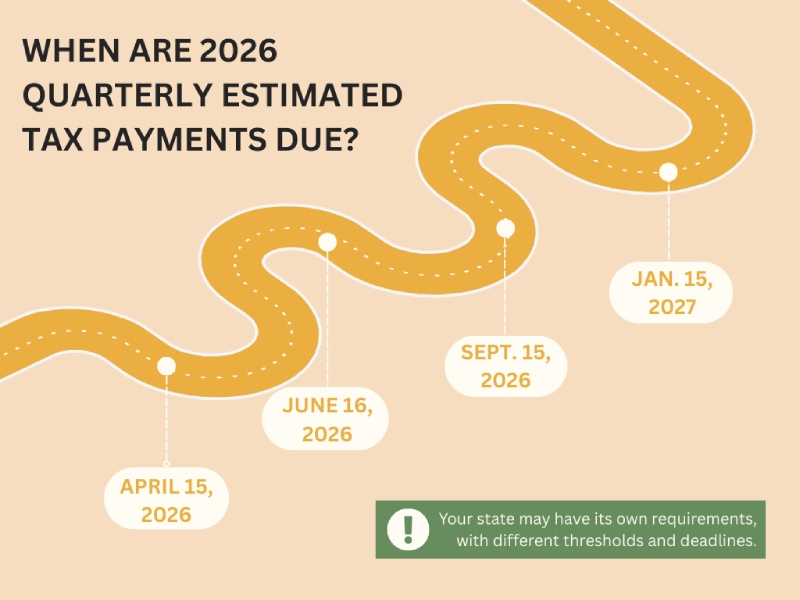
For 2026, the federal estimated tax deadlines are:

  • April 15, 2026
     
  • June 16, 2026
     
  • September 15, 2026
     
  • January 15, 2027 (for fourth-quarter 2026 income)

You’re required to pay as income is earned. So if you skip April and double up in June, the IRS may still assess a first-quarter penalty.

Now, you are allowed to pay more frequently. Some Long Island business owners I work with prefer making monthly payments, because twelve smaller transfers can feel more manageable than four larger ones.

Also, remember that your state may have its own estimated tax requirements, with different thresholds and deadlines. So always check those too.


How to estimate quarterly tax payments 

There isn’t just one method. The right approach depends on how predictable your income is. 

As one method, you can use last year’s total tax liability as a baseline (AKA, the Safe Harbor Approach). This works well if your business’s income is relatively stable. 

For example, if your total federal tax last year was $10,000, you could send in $2,500 each quarter this year.

Under the safe harbor rule, if you pay at least:

  • 100% of last year’s tax (or
     
  • 110% if last year’s AGI exceeded $150,000),

You generally avoid underpayment penalties (even if you end up owing more when you file).

But maybe you have a seasonal business, or you do commission-based work, which makes your income less steady. You could use the Annualized Income Installment Method to estimate your quarterly tax payments. 

With this method, you calculate your income and deductions through the end of each quarter and estimate your tax based on what you’ve earned so far. You then adjust payments accordingly.


How do I make quarterly estimated tax payments?

You’ll use Form 1040-ES to calculate your payments. Then, to actually make the payments, you have a few options. The most commonly used is the Electronic Federal Tax Payment System (EFTPS), a free online service that allows secure payments and keeps a record of your payment history.

You can also mail a check with that Form 1040-ES, which provides a paper trail if you prefer physical documentation. Or, you can use the IRS2Go mobile app on your phone.

If your projections change mid-year, you can always adjust future payments. But when you file your annual return, you may need to attach Form 2210 to explain why the payments weren’t equal. 

And if you overpaid, you can either receive a refund or apply the excess to next year’s estimates.


What happens if I don’t pay quarterly estimated taxes?

If you don’t pay enough in estimated taxes during the year, you may owe an underpayment penalty (with interest) in addition to the tax you still owe. The IRS will send you a notice if that’s the case.

The penalty is calculated based on:

  • The amount you underpaid
     
  • How long the payment was underpaid
     
  • The interest rate for that quarter (which changes quarterly)

The IRS determines the penalty using your total tax liability (your tax accrued minus credits) shown on your return.

There are some special cases where the penalty won’t apply. You won’t owe a penalty if you had no tax liability in the prior year, you were a U.S. citizen or resident alien for the full year, and the prior year covered 12 months.

You could also qualify for a waiver if you underpaid due to reasonable cause, like a casualty or disaster, retirement at age 62 or older, or disability during the current or prior year.


Final thoughts 

Your first estimated payment for 2026 is coming up in only a matter of weeks (April 15). 

And if figuring out how to estimate quarterly tax payments is something you quietly worry about every year, I want to make this year different. 

With the right projection, we can arrive at a number that you can be confident protects you from penalties

So, let’s take a look at your numbers before that first deadline hits.

631-485-7272


FAQs

“What happens if I miss a quarterly tax deadline?”

If you miss a deadline, the best course of action is to pay as much as you can as soon as possible. The IRS calculates underpayment penalties based on how much you owe and how long the payment was delayed. Even if you can’t pay the full amount, making a partial payment immediately will stop the penalty clock on that portion of the debt.

“Can I skip quarterly payments if I didn’t make a profit this quarter?”

Yes. Because you are required to pay tax as you earn income, if your Suffolk County business had a dry spell or high expenses resulting in no net profit for a specific period, you may not owe an estimated payment for that quarter. But you should use the Annualized Income Installment Method to document these fluctuations so you can explain to the IRS why your payments weren’t equal at the end of the year.

“I have a W-2 job and a side hustle. Do I still need to pay quarterly?”

Not necessarily. You can avoid quarterly payments by asking your W-2 employer to withhold extra federal income tax from your paycheck to cover the taxes on your side hustle. As long as your total withholding reaches 90% of the current year’s tax or 100-110% of last year’s tax, you won’t be penalized for not sending in separate quarterly checks.

“Is the 15.3% self-employment tax included in quarterly estimates?”

Yes. When you calculate your quarterly payments using Form 1040-ES, you must include both your standard income tax and your self-employment tax (which covers Social Security and Medicare). 

“Can I pay my quarterly taxes monthly instead?”

Absolutely. While the IRS has four specific deadlines, these are actually the last days you can pay for that period without a penalty. Many gig workers and business owners find it easier to budget by making monthly or even bi-weekly payments.

The 5 Worst AI Mistakes Suffolk County Business Owners Should Avoid

The 5 Worst AI Mistakes Suffolk County Business Owners Should Avoid

Key Takeaways

  • Never automate high-stakes customer interactions entirely. Use AI to handle data gathering, but ensure a human handles emotional or complex resolutions to protect your brand reputation.
     
  • AI output is only as reliable as your input. Clean and audit your spreadsheets and databases before syncing them with AI to avoid costly forecasting errors.
     
  • AI models are prone to hallucinations, confidently stating false facts or laws. Always have a qualified professional review AI-generated legal, financial, or technical documents.
     
  • Set specific ROI milestones for every AI tool to avoid getting trapped in a “sunk-cost fallacy” perspective toward them. If a platform doesn’t increase efficiency or reduce costs, adjust your approach or get rid of it.


If you’re using AI in your business operations, it’s probably because you want to get back more of your time and attention.

But findings in a recent study have shown that 8% of workers using AI actually ended up creating more work for themselves.

I want to make sure you’re in the group that scales… not the group that gets stuck. 

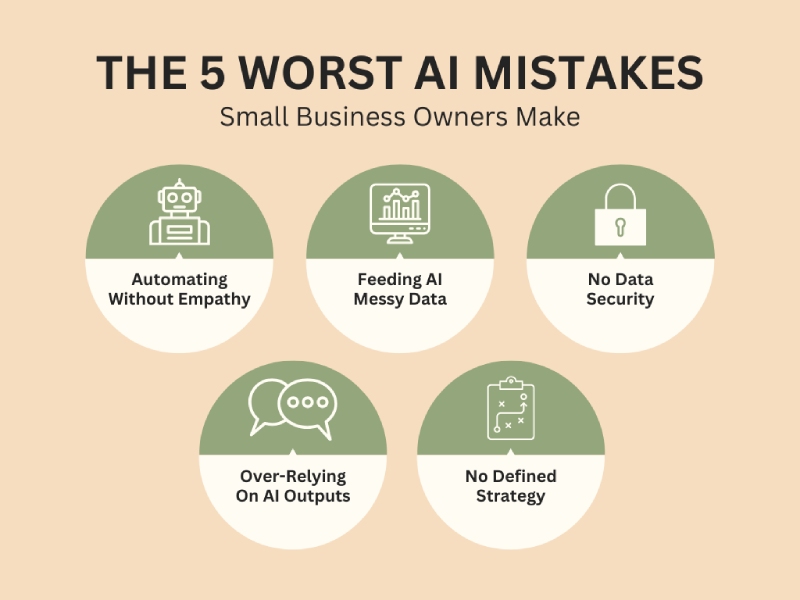
Here are the five worst AI mistakes I see Suffolk County small businesses make.


Mistake #1: Automating Without Empathy

If you’re using AI to do things like answer customer questions, handle support tickets, generate proposals, or write emails, it’s becoming the front door of your brand.

And where that goes wrong is when you connect a chatbot to your knowledge base and essentially walk away. 

Say you own a boutique travel agency, and you install a standard AI agent to process cancellations. One client messages about canceling a honeymoon due to a sudden medical emergency. The AI agent responds:

“Great! I’ve processed your cancellation. Looking for your next adventure? Check out our Tropical Specials for 20% off!”

A technically efficient and relationally insensitive response.

AI doesn’t naturally detect tone, grief, frustration, or nuance unless you intentionally build systems to handle those moments.

Think of AI as the concierge. It gathers information, categorizes issues, and routes conversations. But when a message contains words like emergency, complaint, refund dispute, disappointed (or anything emotionally charged), the system should automatically escalate to a real person.


Mistake #2: Feeding AI Messy Data

AI is only as intelligent as the data you give it.

Many small businesses operate on years of spreadsheets with duplicate entries, outdated pricing, inconsistent naming conventions, and one-off events buried in historical reports.

If you feed that kind of data directly into AI forecasting or decision tools, you’ll get distorted conclusions.

For example, let’s say a local HVAC company implements AI forecasting to predict summer inventory demand. Their system includes prior-year data that contains unusually large bulk orders from a commercial developer who later goes bankrupt.

The AI projected a demand spike, so the owner took out a short-term loan to stock up on inventory.

That inventory sat in the warehouse for nearly a year.

Before implementing forecasting or financial modeling tools, make sure your data:

  • Has no duplicates or obvious errors
     
  • Is limited to the last 24 months, unless older data is specifically needed
     
  • Has unusual events clearly tagged so they are not treated as repeatable patterns

Because an algorithm can’t distinguish between a fluke and a trend unless you tell it to.


Mistake #3: No Data Security

Maybe your staff pastes client contracts, intake notes, payroll data, tax IDs, medical information, or internal financials into free AI tools to summarize them faster.

Later, someone actually reads the tools’ terms of service to discover that the platforms may retain data, store prompts, or use submitted information to improve their models. 

Now, that productivity shortcut is a privacy exposure.

Make sure to deliberately review every AI platform’s privacy policy before approving it for company use. You’re looking for policies about data retention, data sharing, security controls, and whether user inputs are used to train the system. 

Some platforms allow users to opt out of having their content used for training purposes. Make sure to locate that option and disable data sharing for training wherever possible.

And regardless of how strong a system’s security claims appear, your team should never input sensitive information into any AI system.

That includes client data, proprietary company information, payroll records, financial statements, tax IDs, medical details, and anything else that would cause harm if disclosed. 

Because security promises are not a substitute for discipline. Once sensitive data leaves your controlled environment, you’ve increased your exposure.


Mistake #4: Over-Relying On AI Outputs

AI sounds decisive and presents answers in complete paragraphs. But it doesn’t know things the way a professional does. 

It predicts words based on patterns. That means it can cite policies that don’t exist, misstate legal requirements, miscalculate numbers, and invent sources.

Let’s say you own a small services firm and you used AI to draft a payroll policy update. The language looked polished. But it referenced overtime rules for your state incorrectly. 

You copied it into your handbook, and a wage complaint followed.

One of the worst AI mistakes you can make is looking to AI as an authority. Treat it as a draft assistant.

Every AI output should be reviewed by a human, especially if it’s producing anything that affects:

  • Payroll
     
  • Contracts
     
  • Refund policies
     
  • Regulatory compliance
     
  • Customer rights

AI can draft. A qualified human approves.


Mistake #5: No Defined Strategy

I see a lot of Long Island business owners subscribe to tools because their competitors are using them, or because a webinar made the software look transformative. 

Or even because “AI-powered” feels like insurance against being left behind.

But without a defined objective, that tool just becomes another monthly charge.

And those tools accumulate fast: Marketing AI. Writing AI. Meeting AI. Sales AI. Forecasting AI. Chatbot AI. HR AI.

Before long, you’re paying for six overlapping tools. And still reviewing everything manually because you don’t trust the outputs.

So, before adopting any AI system, define 1) what measurable outcome you’re trying to achieve and 2) how you’ll track whether the tool is actually boosting profitability.

Over time, as you’re using AI tools, make sure you’re evaluating how much time you’re actually saving and what errors you’re reducing (or introducing).

The last thing you want is to spend a year integrating expensive AI systems only to discover they haven’t reduced labor hours, increased margins, or improved customer retention in any meaningful way.

Track each tool’s ROI. Review it quarterly. If it’s not working, adjust your approach or quit using it.


Final thoughts 

When you slow down enough to define the proper guardrails and review standards, that’s when AI really starts making your business more productive.

If reading this has made you realize you’re making some major AI mistakes, let’s clean up your system. 

Although I won’t position myself as an expert on every AI tool out there, I can help you identify the best areas of opportunity for improving efficiency in your Suffolk County business. And I can help you reliably measure your chosen AI tools’ improvement in those areas.

631-485-7272


FAQs

“Why is my AI tool creating more work instead of saving time?”

One of the worst AI mistakes you can make is not having a defined strategy. If you implement a tool without a clear objective, you end up spending more time correcting the AI’s typos, double-checking its math, or fixing its tone than you would have spent doing the task yourself. Treat AI as a draft assistant, not an automated replacement. 

“How do I stop my AI chatbot from sounding cold to customers?”

To keep your brand’s empathy intact, set up automated escalation triggers. Program your system to flag emotionally charged words like emergency, refund, disappointed, or manager. When the AI detects these, it should immediately route the conversation to a human. 

“Can I use free AI tools for summarizing client contracts or payroll?”

It’s not advisable. Most free AI platforms use your inputs to train their future models, meaning your sensitive data could technically become part of the public knowledge base. Before using any AI tool for business, check the privacy policy for data training opt-outs. And never paste Tax IDs, payroll records, or proprietary client information into an AI prompt. 

“How does messy data ruin AI forecasting?”

AI reflects whatever you feed it. If your spreadsheets have duplicate entries, outdated pricing, or one-off fluke events, the AI will see those as a permanent trend. Before you let AI predict your future inventory or sales, clean your data. Limit the AI’s view to the last 24 months and manually tag unusual events so the algorithm knows not to repeat them.

“Is AI legally reliable for drafting company policies or handbooks?”

No. AI is a probabilistic engine, not a legal expert. It can confidently cite labor laws or tax codes that don’t actually exist. While AI is great for creating a rough outline of a payroll policy or employee handbook, a qualified human (or legal counsel) must review and approve every word before it becomes official company policy.

“How do I know if an AI tool is actually worth the monthly subscription?”

Start looking at measurable outcomes. Every quarter, ask yourself if the tool has reduced labor hours, increased my profit margins, or improved customer retention. Audit your full AI stack every 90 days and cut anything that isn’t providing a clear return on investment.